A macro tracking meal planner that counts while you plan
A macro tracking meal planner should count the week you planned, not ask you to log it again afterwards. In PrepWise every recipe calculates its own calories, protein, carbs, and fat, so the numbers are attached to the meal from the moment it goes on the calendar.
Which means the tracking happens on Sunday, once, instead of three times a day at the plate.
iPhone only, iOS 15.1 or later. Free to download.
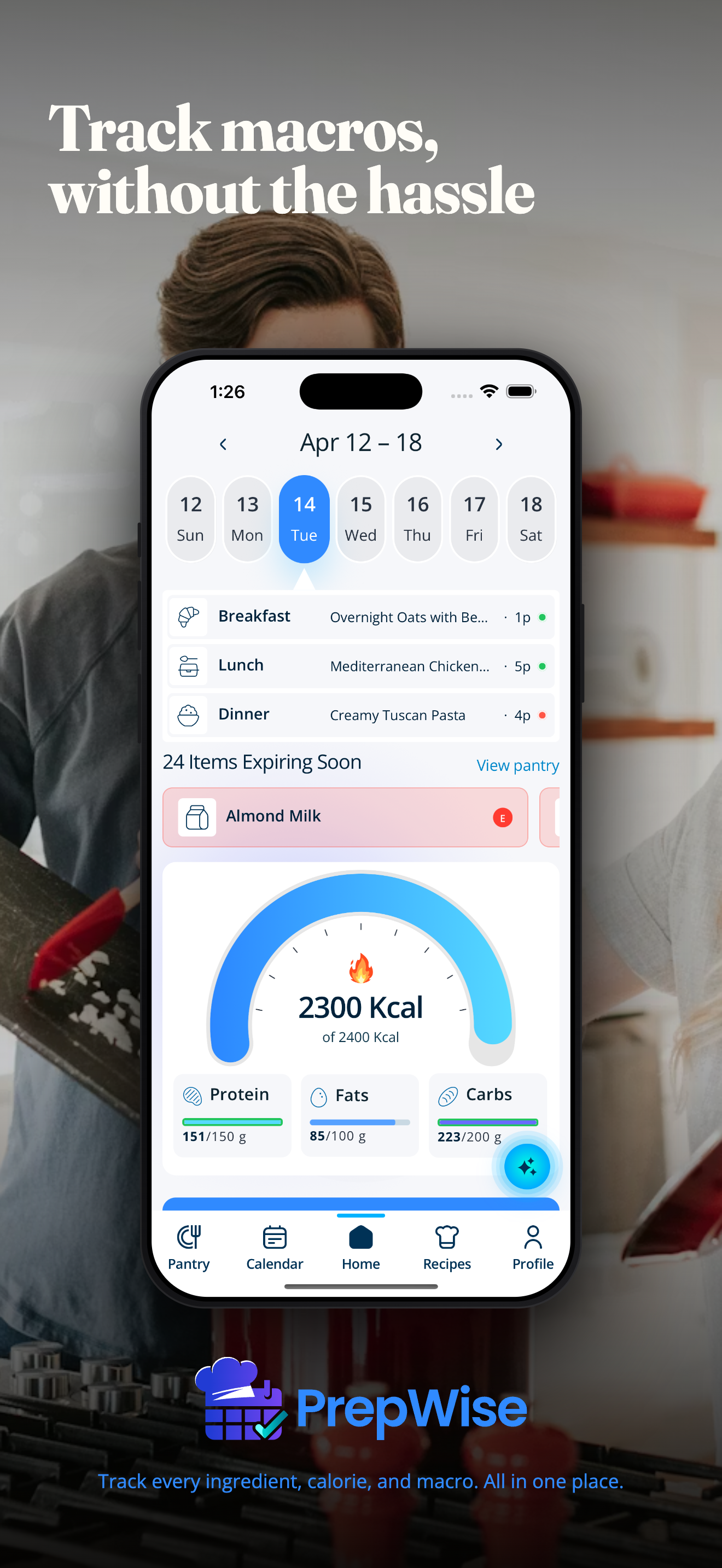
The numbers arrive with the recipe
Calorie tracking usually happens after the fact. You cook, then you log, then you find out on Thursday that the week was 40 grams of protein short every day and there is nothing to be done about it.
Planning is the only point where the number is still useful, because it is the only point where you can change it. Every PrepWise recipe carries its own calories and macros, so a week on the calendar is a week already counted, and a gap is something you fix on Sunday by swapping one dinner.
Hit the target with food that is already on the shelf
The generated-plan apps work from the numbers down: give them a protein target and they hand back a week of food you do not own. The shop that follows is the real cost, and it is the reason most of those plans get abandoned in week two.
PrepWise works the other way. Ask for a high-protein dinner using the chicken and sweet potatoes already in your pantry and it builds that, macros attached. The pantry tracker is what makes that possible: the planner can only cook from a shelf it can see.
You can still ask for a full week. It is just a week built out of food you have, with a short list for the rest.
One app for the plan and the numbers
The usual setup is a meal planner and a separate tracker, with you as the integration between them: plan in one, retype in the other, and hope the portion sizes matched.
Here they are the same object. Change the meal and the numbers change. Reserve the ingredients for it and the shopping list updates. Nothing gets typed twice, so nothing drifts.
Batch cooking without losing the count
Cooking one anchor in quantity is what makes a high-protein week survive a Tuesday, and it is where hand-counting normally breaks down: one big pot, four different plates, and nobody knows what each of them was.
Because the macros belong to the recipe, portions of it carry their share. The meal prep page covers planning a week around one or two anchors, and the counting comes along for free.
What it costs, and what you get without paying
PrepWise is free to download. The free tier holds 15 saved recipes and 20 assistant messages a day, which is enough to plan and count a real week before deciding anything.
Pro is $6.99 a month or $39.99 a year, with a 7-day trial. iPhone only, iOS 15.1 or later.
When this is not the tracker you want
If you want to weigh and log every plate to the gram, this is not that. PrepWise counts the plan; a dedicated logging app counts the day, and they are different jobs.
If you are competing and need a coach setting your numbers, PrepWise does not set targets for you. It tells you what the week you planned adds up to.
And it is iPhone only. There is no Android build.
Frequently asked questions
Does PrepWise count calories as well as macros?
Yes. Every recipe calculates calories along with protein, carbs, and fat, and the numbers are attached to the meal rather than entered separately.
Does it set my macro targets for me?
No. PrepWise is not a coach and does not prescribe numbers. You bring the targets you are working to, and the planner shows you what the week adds up to against them.
Do I still need a separate calorie tracking app?
Not for the meals you plan here, because those are already counted. If you want to log everything you eat including things you did not plan, a dedicated logging app is still the better tool for that half.
Can it plan a high-protein week from what I already have?
That is the intended use. Ask for it in plain words, name the ingredients you want to spend, and it builds the week around them with the macros attached.
More answers on the PrepWise FAQ.
Also on PrepWise
- Meal prep app
Plan a week of meals around what is already on your shelf, then shop for the gap. Free on iPhone.
- Pantry tracker
Track every ingredient, then let the list tell you what is for dinner. Free on iPhone.
- Pantry meal planner
Plan the week from what is already in your kitchen, then shop for the gap. Free on iPhone.
- Grocery list app
The list is your week minus your shelf. Shorter than you expect, and never a duplicate buy.
- PrepWise FAQ
Pantry, planning, macros, sharing, and billing questions, answered directly.
- PrepWise for iPhone
What the app does, and how the pantry-first plan works in practice.